
https://fowlie.github.io/2022/02/25/keyboards-rabbit-hole/
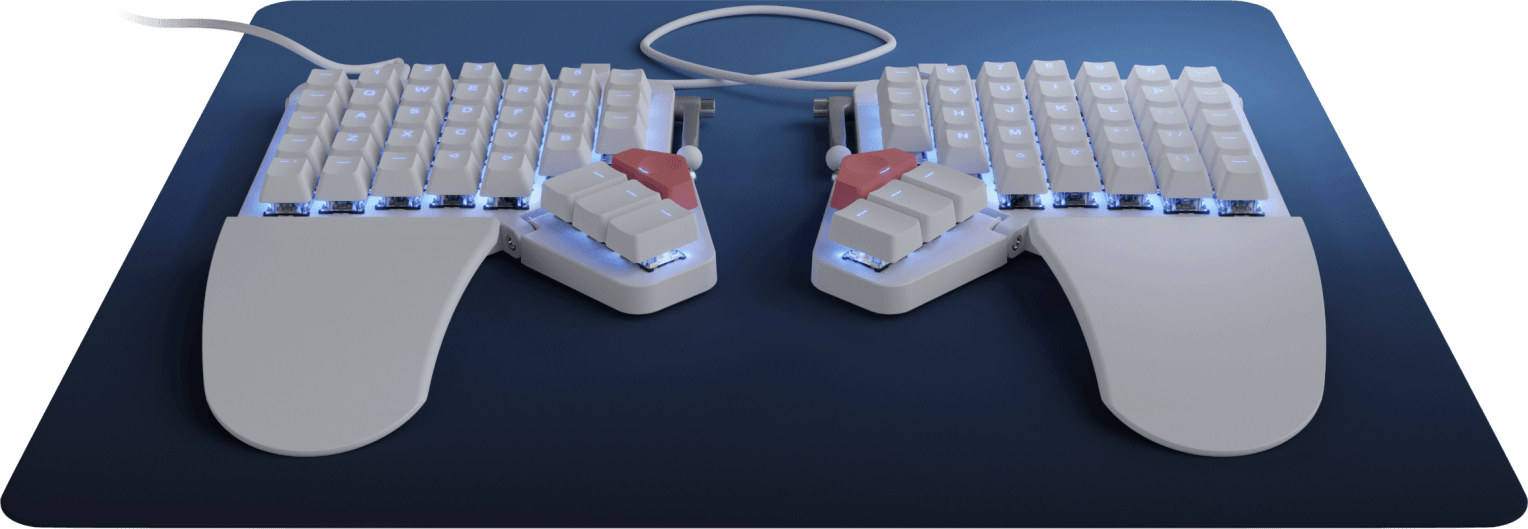 I’m writing this to share my experience adapting to weird keyboards and layouts.
A few years ago a colleague of mine introduced me to 60% keyboards. Today, I’m typing this blog post on a 42 key US Colemak-DH layout. With this blog post I will try to share what my journey was like.
Many people are afraid of keyboards like these and might try to talk you out of buying one. To them, I say this: Your keyboard is kind of like your instrument in your profession. Professional musicians don’t play on crappy equipment, right? 😉
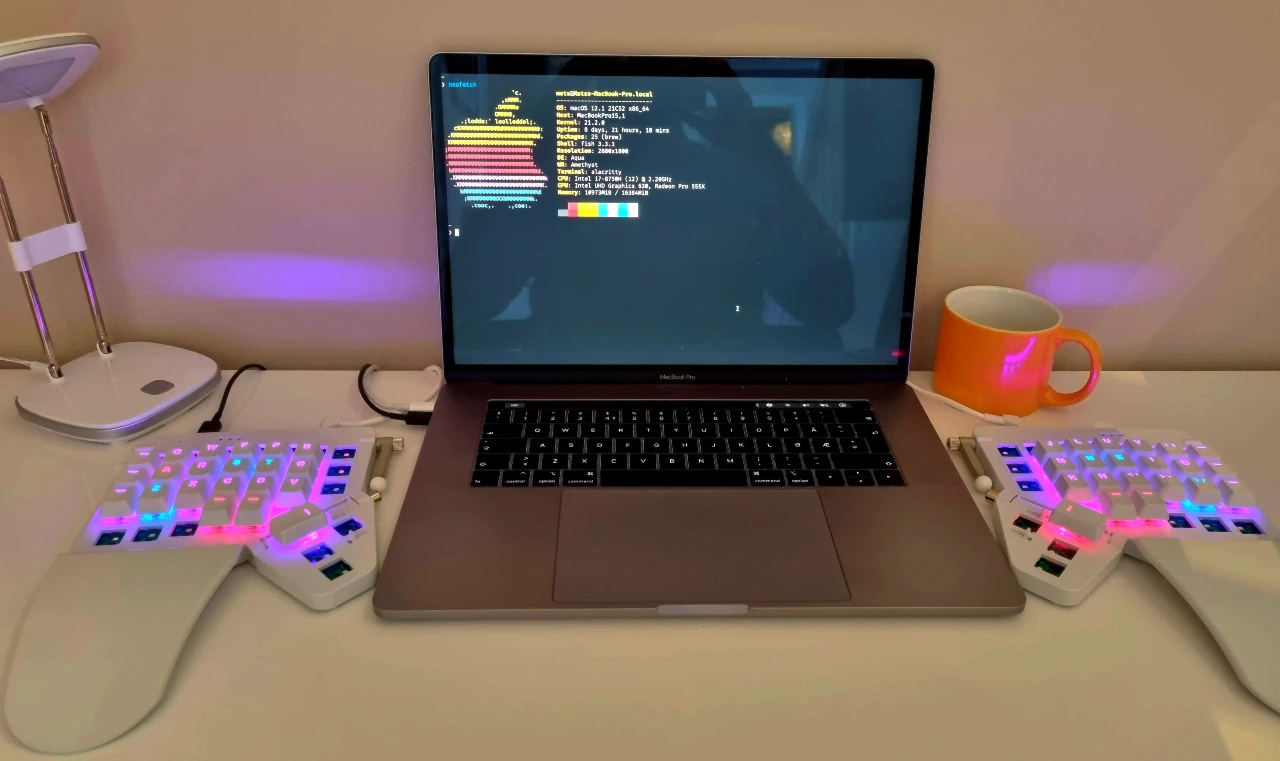
But let’s start from the beginning. I had a cheap Logitech keyboard with Norwegian ISO layout. Then I read somewhere that writing code actually would be a lot smoother using the US layout. This is where it all started.
US Layout while typing Norwegian
If you are already using a US keyboard layout, go ahead and skip this paragraph. So you’re still here, that might mean that you’re using some European layout, am I right? The Norwegian layout is terrible for coding, because you’d use the right-alt modifier to type many special characters. I didn’t have a keyboard with a US layout, so I just printed out a cheat sheet and put it on my desk. So after a few days of getting used to the new positions of the special characters, I really enjoyed the feeling. In the beginning I was switching between US and NO layout in the operative system with a keybinding. It worked fine, but a lot of times I would type the wrong characters only to realize I was typing with the wrong layout.
EurKey to the rescue
I discovered a keyboard layout you can install on your computer which is made by a German guy named Steffen Brüntjen and is based on the US layout. It is called EurKey, and the way you would type European special letters is by pressing the right-alt followed by another key. For instance, right-alt + q would print æ, right-alt + l prints ø and right-alt + w prints å.
My first mechanical keyboard
A colleague of mine showed me his Happy Hacking Keyboard which is a mechanical keyboard with no arrows. When he later bought a brand new WASD 61 key keyboard with Cherry MX Brown switches I was sold and decided to try for myself. I went for the Anne Pro 2 which was similar, but cheaper and actually programmable. It’s also wireless and the battery lasts for a week or more. I really love this keyboard!
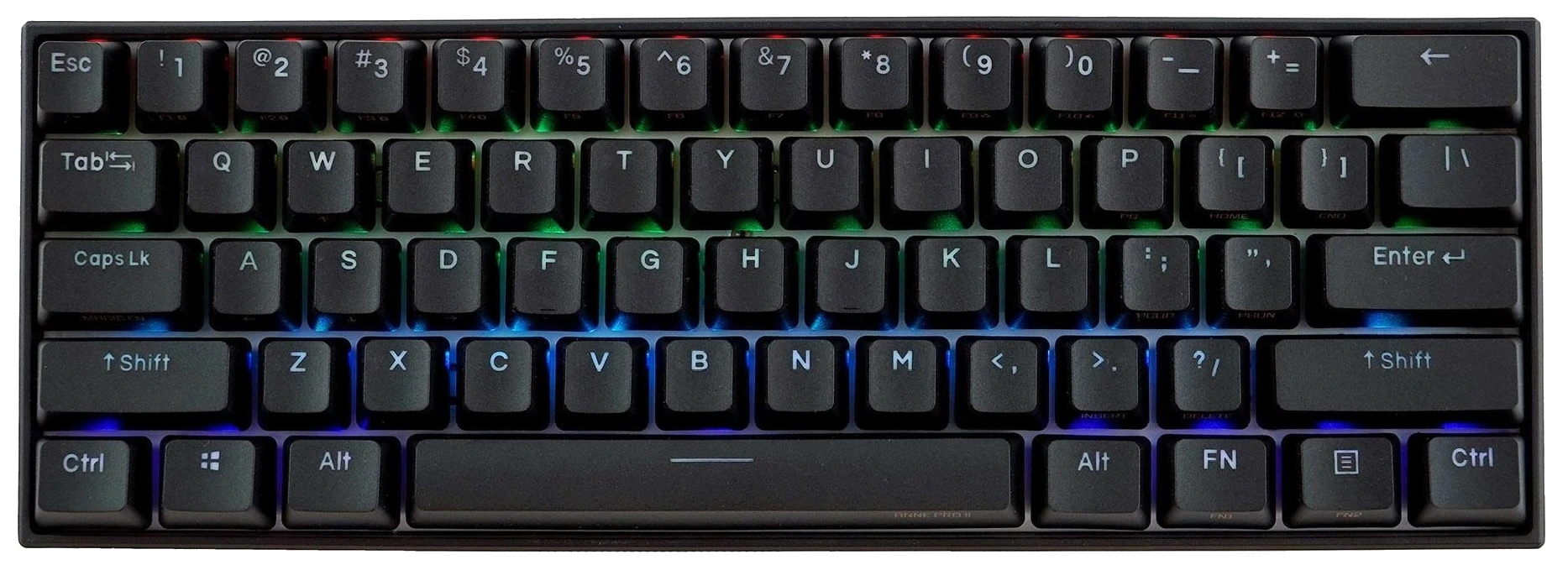
Being a vim user, I mapped the hjkl keys to act like arrow keys. Also with the Vimium extension for Firefox, I could use the vim-keybinding everywhere!
Death to the Caps lock key
Emacs users often get the credits for inventing this hack. And that hack is about realizing how stupid they caps lock key really is. Well, maybe not stupid, but unless you write SQL all day long, you’re not using it enough for it to deserve such a good position right there on the home row on your keyboard. Replace it with ctrl! If your keyboard firmware has the ability to map different keys when you hold or tap a key, you can even map it to Esc when you tap it and ctrl when holding it. You can do this easily on the Anne Pro 2.
If you have some extra time you should check out this funny but relevant comic text about improving design by removing useless stuff.
Moonlander, the keyboard from heaven?
The Moonlander from ZSA is an ergonomic, split, ortholinear mechanical and programmable keyboard. By the way, ortholinear means that all the keys are arranged as if in a grid rather than the normal staggered layout. You can program it to do basically anything you want with different layers, macros and also tap and hold can do different things. You can even control the mouse, or create a separate layer for stenography if you’re into that sort of thing.
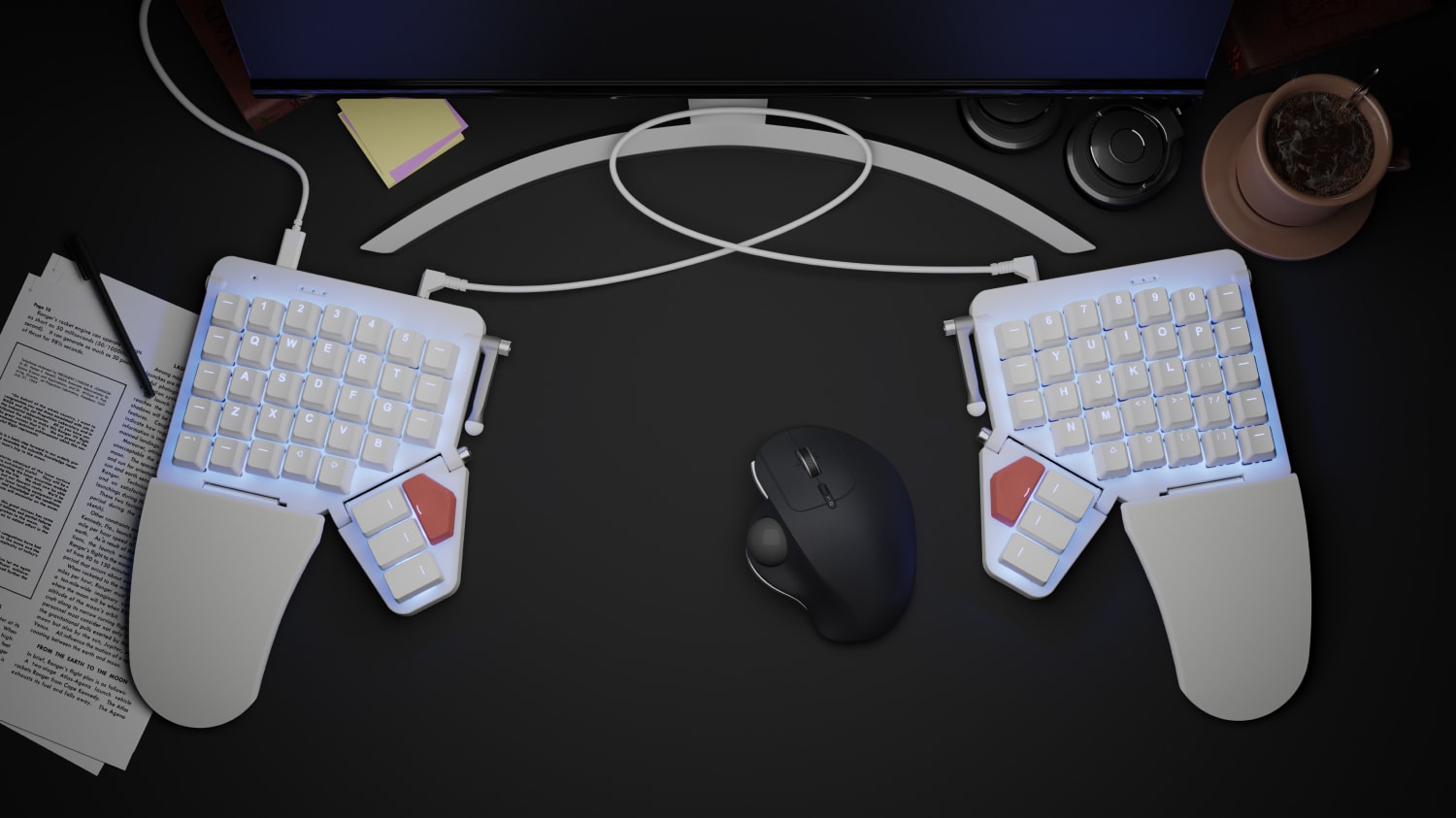
It’s also very expensive, from USD $365. Wanted it for months and finally ordered it. Took like 3 days to ship it all the way from Taiwan, very impressive! This keyboard is a monster, and you have to tame it before you can use it. I printed out all the layers and hung them up on my desk. I quickly iterated different layouts on the thumb clusters, but it never quite felt natural. It’s a strange feeling to mess around with keys like ctrl, backspace and enter. It hurts to adjust your brain to a keyboard like this. After a few months I stopped using it. It was just too big (coming from a 60% layout), and I have relative short pinkies so touch typing was not a good experience.
Done with Moonlander (for now)
Why did I mention a keyboard I stopped using anyways? Because I found a way to make it work like a charm, but since I’m writing this in a chronological order, we are going down another rabbit hole first. A rabbit hole in another rabbit hole. Yes. There’s actually a whole maze down here. We’re entering the keyboard layout rabbit sub-hole.
I’ve always liked simple solutions to complex problems (or even avoiding the problem in the first place), and while the Qwerty layout isn’t so bad, it’s designed for the mechanical type writer in mind. When designing a keyboard layout for a computer, you could start from scratch. In my head, this is reason enough to ditch Qwerty! So I then re-programmed my keyboard with a Colemak layout, and rearranged all the key caps. This feels really painful at first, but after a couple of weeks my typing speed slowly came to a point where I could use it at work. But I never liked loosing the vim-keys I was so used to, like the hjkl, and I switched back to Qwerty for a long time.
Inspired by ThePrimeagen, I decided to learn the Dvorak keyboard layout. I noticed that the j and k was next to each other, which fits nice with the vim-keys. After switching my typing speed dropped from ~80 wpm to 8 wpm! I got up to about 50 wpm with Dvorak on my Anne Pro 2 keyboard. At this point I started to notice how my right ring finger was stretching up to reach the L key all the time, and it was starting to get annoying. So I decided to ditch Dvorak, and went back to Qwerty. But once in a rabbit hole, you can’t get back up.
Workman and Colemak-DH
I stumbled over the Workman layout, a modern layout designed to solve some issues with the Colemak layout. I used it for a couple of weeks, and I liked this layout from the first word I typed. It wasn’t that much different from Qwerty either, so the learning curve was nicer than with Dvorak. I read some criticism where typing the work fuel required a lot of vertical movement with only two fingers. The solution for this is actually a modified Colemak layout.
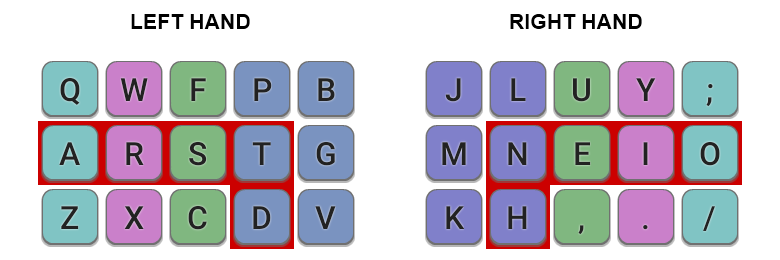
The name says it all, because it basically takes the Colemak layout and moves the D and H keys away from the center columns (one row down and one step outwards). I’m pretty happy with this layout, and while not typing at 80 wpm yet, I’m determined to go all in on this one.
Colemak Mod-DH main keys for a matrix-like keyboard, known as Colemak-DH. Keys are colored according to the finger that should be used. The 10 most common English letters are assigned to the 10 easiest keys (highlighted in red).
https://colemakmods.github.io/mod-dh
Reducing Moonlander to a 42 keys layout
I came across Ben Vallack’s channel on YouTube where he talks about surviving with 42 keys. He actually used a Moonlander keyboard and had physically removed all unused keys. I liked the idea of less keys, as my fingers would better reach every corner of the keyboard without me having to move my hands so much.
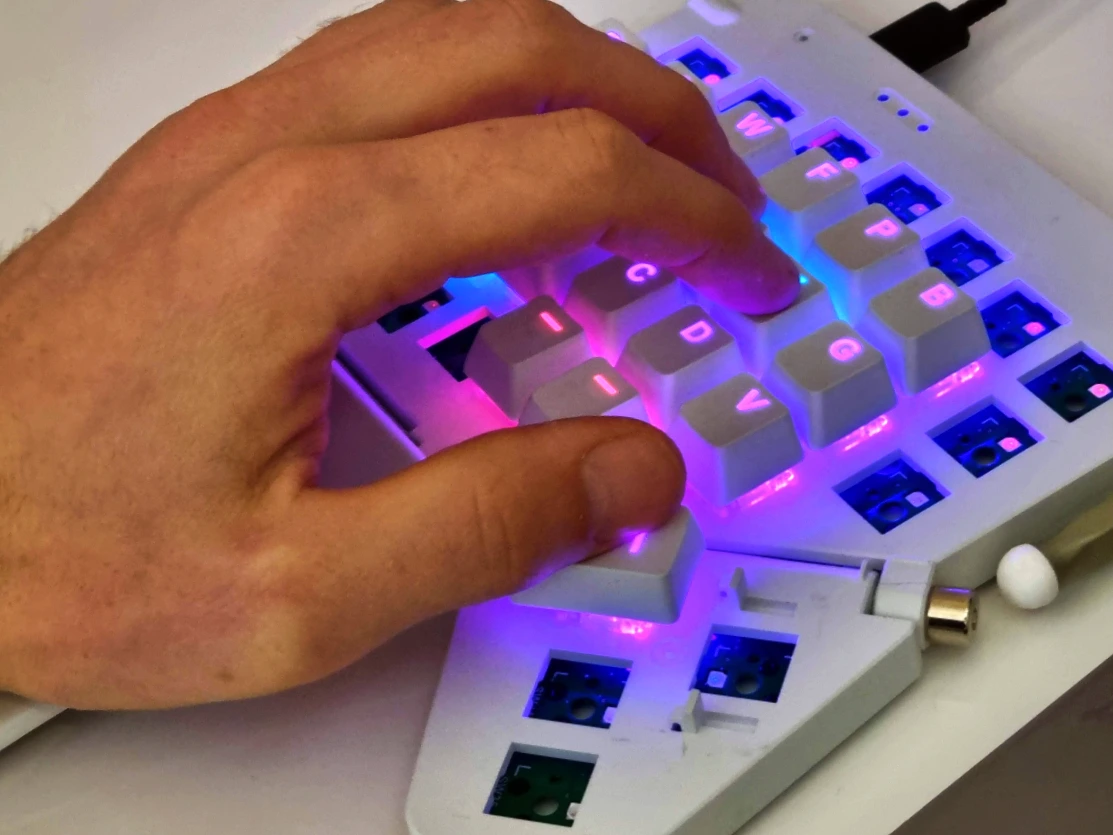
The main challenge would be to create a layout that would fit all the necessary keys, and create meaningful layers that are not hard to learn or use. I borrowed a lot of ideas from Ben, but I have also tried to make it fit for my own needs as well. You can check out my layout here.
Future plans
Now I have the layout I want, I need to train myself to type fast again. I can recommend checking out monkeytype.com. There you can even use a normal Qwerty keyboard, press Esc or go to settings and choose “Layout emulator”. Another tip is to enable stop on error, so that it forces you to hit the correct key. To enable this, again go to settings and “Stop on error” followed by either “letter” or “word”.
I’m also looking for the perfect keyboard to match this setup, which I’m pretty satisfied with as of now. However, this deep down in the rabbit hole, I’m not going to find the perfect keyboard at amazon.com. I need to build one myself. Luckily many people actually do this, and share their PCB design at github.com as open source! There’s a comprehensive list of them here. That’s it for now, I got to go learn how to build keyboard with an soldering iron and, I guess, dive into the next rabbit hole down here.
References
- The European keyboard layout homepage
- Dvorak keyboard layout article on Wikipedia
- The Workman keyboard layout
- The Colemak keyboard layout homepage
- The Colemak Mod-DH homepage
- MonkeyType for type training
- Ben Vallack’s Youtube channel
- My Moonlander layout configuration
- Anne Pro 2 keyboard
- Moonlander keyboard
- GergoPlex keyboard (DIY)
- Ferris keyboard (DIY)
- Keebfolio, a comprehensive list of keyboards
- Keyboard layout editor
- Vimium, the hacker’s browser
The average individual type is between 38 and 40 words per minute (WPM). It translates to 190 to 200 characters per minute (CPM). However, expert typists type very fast, averaging between 65 and 75 WPM. Let’s see with monkey type tool how many typing speed you have.
Hi. Can you implement word wrap into your typing tests? Cuz its very annoying to see words broken up at the end and start of lines!
A monkey type is an assessment or exercise designed to measure a person’s typing speed, accuracy, and overall proficiency in using a keyboard to type written content.
Dino Game is a simple but attractive running game built into the Google Chrome browser. With classic pixel graphics and easy gameplay, the game takes players on an endless adventure with the T-Rex dinosaur, dodging obstacles like cacti and pterodactyls.
https://dinogame.app/
I always leave this blog feeling inspired and motivated to make positive changes in my life Thank you for being a constant source of encouragement
For those looking to improve their speed, the click tester offers a great opportunity. This simple tool allows you to see how fast you can click in a short amount of time. It’s perfect for gamers and professionals alike, offering valuable feedback to help improve your performance.
The click test is a great way to assess how fast you can click under pressure. It measures your click rate over a few seconds, providing insights into how well your mouse performs during fast-paced tasks. Whether for gaming or work, it’s a useful tool to track and improve your speed.
https://gitlab.com/lovelanguagetests
This information is highly insightful and full of value. We hope you’ll keep producing such meaningful content. For more about our entertainment services, feel free to explore the link below.
mu88
This information is highly insightful and full of value. We hope you’ll keep producing such meaningful content. For more about our entertainment services, feel free to explore the link below.
mu88
Introducing to you the most prestigious online entertainment address today. Visit now to experience now! Website: https://oakbit.io/
69VN is one of Vietnam’s top-tier reward-based gaming platforms, offering exciting and immersive entertainment experiences. Players can dive into a wide variety of games such as slots, tài xỉu, fish shooting, 90s-style jackpot spins, scratch cards, and roulette — all designed for fast-paced fun and real money rewards.
awesome
I recommend trying this out – surprisingly fun! Color blind Test
A Quardle tool is an online word puzzle game where players try to guess multiple words at the same time, usually four words in a single challenge. It is inspired by classic word guessing games but adds extra difficulty by requiring players to think strategically across multiple grids.
Monkey type is completely free to use and accessible to anyone with an internet connection. It does not require mandatory registration, although creating an account allows you to save your progress and track performance over time.
Great write-up on the layout journey. The jump from Qwerty to Dvorak and then Workman takes serious commitment. One thing I found useful when switching layouts or keyboards is running a quick keyboard test online before the full typing practice. It catches dead keys, missed registrations, and firmware issues instantly. Especially helpful after flashing a new QMK layout to a Moonlander since you can verify every key actually fires before committing to a speed session.
https://core-ball.org
is a simple yet highly addictive online game where players must shoot small balls into a rotating central core without hitting other balls already attached to it. The main objective is to complete each level by placing all your balls correctly. As the game progresses, the difficulty increases with faster rotations and tighter gaps. It tests your timing, precision, and focus. The minimalist design and easy controls make it accessible to everyone, while the challenging gameplay keeps players engaged for long sessions.
, Quardle can be suitable for beginners, although it may feel challenging at first. New players can start by focusing on one grid at a time while still observing how their guesses affect the others. With practice, it becomes easier to understand patterns and make better guesses. Beginners are encouraged to use common words and pay attention to feedback from the game. Over time, they will develop strategies to handle multiple words simultaneously and improve their performance significantly.
Core Ball is a simple yet highly addictive online game where players must shoot small balls into a rotating central core without hitting other balls already attached to it. The main objective is to complete each level by placing all your balls correctly. As the game progresses, the difficulty increases with faster rotations and tighter gaps. It tests your timing, precision, and focus. The minimalist design and easy controls make it accessible to everyone, while the challenging gameplay keeps players engaged for long sessions.
https://core-ball.org
offers several unique features that set it apart from other typing platforms. These include a minimalistic interface, customizable themes, and adjustable test settings. Users can choose different word lists, time limits, and difficulty levels based on their preferences. It also provides detailed performance statistics such as consistency, error rate, and typing history. The platform supports multiple languages and allows users to personalize their typing experience. These features make Monkeytype a versatile and powerful tool for improving typing skills effectively.
https://core-ball.org
. The most important is to stay calm and observe the rotation pattern before shooting. Timing is key, so avoid rushing your moves. Waiting for consistent gaps can increase your chances of success. Practicing regularly helps improve accuracy and confidence. It is also helpful to focus on rhythm, as many levels follow a predictable rotation pattern. By applying these strategies, players can complete levels more efficiently.
Core Ball typically features dozens of levels, and in some versions, even hundreds. The number of levels may vary depending on the platform or version of the game you are playing. Each level introduces new challenges, such as faster rotation speeds or more balls to place. As you progress, the difficulty increases steadily. This keeps the gameplay fresh and engaging. Players often aim to complete all levels as a personal achievement, making it a long-lasting and rewarding experience
, Core Ball is suitable for players of all ages. Its simple mechanics make it easy for beginners and younger players to understand, while the increasing difficulty provides a challenge for experienced gamers. The game does not contain complex controls or inappropriate content, making it family-friendly. Players of different age groups can enjoy it at their own pace. Whether you are a casual gamer or someone looking for a quick mental challenge, Core Ball offers an engaging experience for everyone.
A good strategy for Quardle is to begin with broad guesses that include common letters. This helps reveal useful clues across all grids. Avoid focusing on a single word too early; instead, gather information for all puzzles. Once you have enough clues, start narrowing down possibilities for each word. Managing your attempts carefully is crucial since you have limited guesses. Staying organized and keeping track of known letters will help you solve all words more efficiently.
Quardle has become popular because it offers a unique twist on traditional word puzzle games. The challenge of solving multiple words at once makes it more engaging and rewarding. It appeals to players who enjoy mental challenges and want something more complex than standard word games. The daily puzzle format also keeps users coming back regularly. Its simplicity, combined with increasing difficulty, creates a satisfying experience that attracts a wide range of players.
Quordle’s popularity comes from its perfect balance of simplicity and challenge. The rules are easy to understand, but mastering the game requires skill and experience.
Many players enjoy sharing their daily results with friends and comparing solving strategies. This social aspect adds another layer of engagement and motivates players to improve their performance.
Additionally, each puzzle feels unique. Even experienced players encounter fresh challenges every day, keeping the experience interesting and rewarding.
Read your blog and loved it so much thank you
Core Ball is a simple yet highly addictive online game where players must shoot small balls into a rotating central core without hitting other balls already attached to it. The main objective is to complete each level by placing all your balls correctly. As the game progresses, the difficulty increases with faster rotations and tighter gaps. It tests your timing, precision, and focus.
Core Ball helps improve several important skills, including hand-eye coordination, timing, and concentration.
Core Ball typically features dozens of levels, and in some versions, even hundreds. The number of levels may vary depending on the platform or version of the game you are playing.
Core Ball can be played online for free on various gaming websites. It does not usually require downloads or installations, making it easily accessible from any browser.
Core Ball is usually due to poor timing or rushing shots. The game requires patience and careful observation of the rotation pattern. Many players make the mistake of shooting too quickly without analyzing the movement. Distractions and lack of focus can also lead to errors. It is important to stay calm and wait for the right moment.
Core Ball, the player taps or clicks to launch a ball toward a rotating central object. The goal is to attach all balls to the core without colliding with previously placed balls.
Core Ball helps improve several important skills, including hand-eye coordination, timing, and concentration. Players must carefully observe the movement of the rotating core and decide the perfect moment .
Core Ball is usually due to poor timing or rushing shots. The game requires patience and careful observation of the rotation pattern.
Core Ball helps improve several important skills, including hand-eye coordination, timing, and concentration. Players must carefully observe the movement of the rotating core and decide the perfect moment to release the ball.
Core Ball becomes challenging due to increasing speed and tighter placement spaces as levels progress.
to try again immediately after failing. This creates a loop of continuous play. Additionally, the satisfaction of Core Ball is addictive because of its simple gameplay combined with increasing difficulty.
The number of levels may vary depending on the platform or version of the game you are playing. Each level introduces new challenges, such as faster rotation speeds or more balls to place.
Core Ball contribute to its popularity among casual gamers who want quick entertainment without any cost.
The need for precision and patience adds to the difficulty. Unlike many games, there is no shortcut to success, which makes each victory more satisfying.
This balance of simplicity and challenge keeps players engaged.
A Quardle tool is an online word puzzle game where players try to guess multiple words at the same time, usually four words in a single challenge.
Improving your Quardle skills requires practice, patience, and a good strategy. Start with words that contain common vowels and consonants to gather useful information early. Pay attention to letter placements and avoid repeating incorrect letters.
In Quardle, players typically get a limited number of guesses, often around 9 attempts, to solve all the words. This restriction adds to the challenge, as you must use each guess wisely.
Thanks for sharing this. Photographers looking for photo delivery software should probably explore FotoReva and compare its features with alternatives.